


I use the Olive Garden Italian Kitchen app as a practical companion for planning a restaurant visit rather than as a general food-discovery tool. It is a free Food & Drink app from Darden Restaurants, Inc., built around finding an Olive Garden location, joining the Wait List, arranging ToGo orders, and handling gift cards. That focus makes it easy to understand: it is most useful when I already know I want Olive Garden and need to reduce the amount of time spent on the phone, at the entrance, or in a checkout line.
My overall impression is positive, with an important qualification. The app has a useful set of restaurant-specific tasks in one place, but its value depends on whether Olive Garden is already part of your plan. If you want a broad restaurant search, delivery comparison, or a meal-planning service, this is not the right kind of app. If you regularly visit Olive Garden, however, keeping it installed can make several ordinary errands more manageable.
What the app is really designed to do
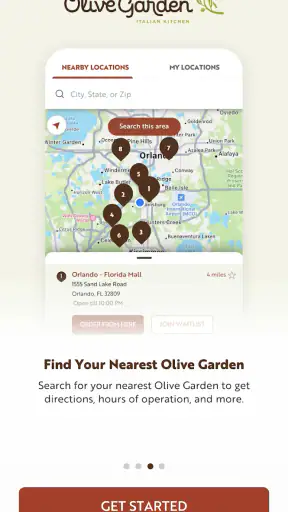
The strongest part of the experience is its narrow purpose. Instead of trying to become a full restaurant marketplace, it concentrates on the actions I would expect from an official Olive Garden tool: locating a nearby restaurant, joining the Wait List, placing a ToGo order, and buying gift cards. That concentration generally makes more sense than forcing users to navigate a large collection of unrelated restaurant features.
I would describe it as a planning and ordering utility, not a dining guide. The distinction matters because the app works best before I leave home or while I am deciding how to handle a meal. I can use the location function to identify a convenient Olive Garden, consider the Wait List when I expect a busy visit, or arrange ToGo instead of entering the restaurant without a plan.
The app is free and carries an Everyone age rating, so it is approachable for households where different people may need to use it. It was released on March 29, 2016, and the current version is 7.70.0. Those details suggest a product that has been maintained over time rather than a newly launched experiment, although the age of the original release also means the interface may feel more like a mature restaurant utility than a fresh, trend-focused food app.
Its public reach is substantial, with more than a million installs. The average rating is 3.5 from roughly seventeen thousand ratings, alongside about five and a half thousand written reviews. I read that combination as a sign that the app is useful for many people but not universally smooth. It is worth approaching as a convenient tool with a few possible rough edges, not as something that will automatically improve every Olive Garden visit.
Where it saves time before a meal
The most useful workflow for me begins with the location finder. Rather than searching the web, opening a map, and then switching to another service to determine whether the restaurant supports the action I want, I can start inside the official app. This is especially helpful when I am away from my usual neighborhood and want to identify the closest practical location before making a decision.
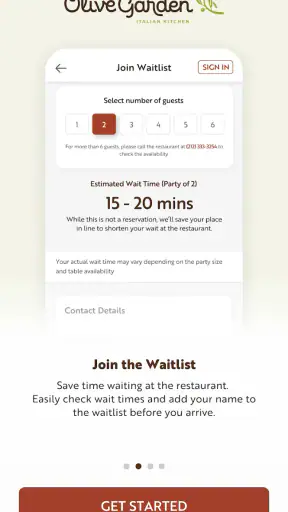
The Wait List option is more valuable when used before arriving, not after I am already standing outside. In a realistic evening scenario, I might be leaving work with family and know that nobody wants to wait around while someone handles the logistics. I can check the restaurant through the app, join the list when appropriate, and use the travel time to get there instead of treating the entrance as the beginning of the process.
There is a trade-off here: joining a Wait List is not the same as having a guaranteed table at a precise minute. I would still allow some flexibility for traffic, delays, and changes in the restaurant’s pace. The app can help me organize the visit, but it cannot remove the uncertainty that comes with a busy dining room.
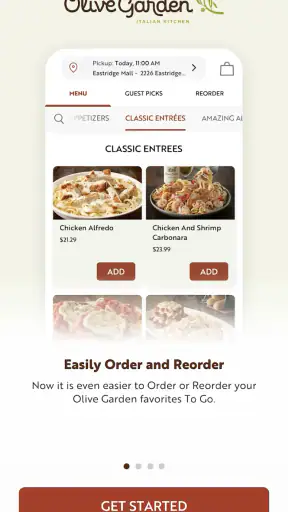
For ToGo, the benefit is different. The app is most convenient when I already know I want takeout and can place the order before I arrive. That lets me separate ordering from collecting the food. I would use it on a workday when I have a fixed break, or on a night when I want an Olive Garden meal at home without spending time deciding at the counter.
One practical tip is to decide whether you are using the app for a sit-down visit or ToGo before starting the process. Switching between those intentions late in the workflow can create unnecessary friction, especially if you are trying to coordinate a group meal. I find it easier to confirm the restaurant first, then choose the action that matches the occasion.
How it feels during busy, heavy-use moments
The app’s usefulness becomes more apparent when several people are waiting for an answer at once. A family may be debating where to eat, someone may be checking whether a location is convenient, and another person may be trying to arrange takeout. Having those restaurant-specific tasks in one application is simpler than passing a phone around between a map, a browser, and a separate ordering service.
That said, heavy-use moments expose the limits of a focused restaurant app. If I am comparing Olive Garden with several nearby restaurants, I would rather use a map or a broader dining service for the initial decision. The Olive Garden app is not where I would begin a neighborhood-wide search. Its advantage starts after the restaurant has entered the conversation.
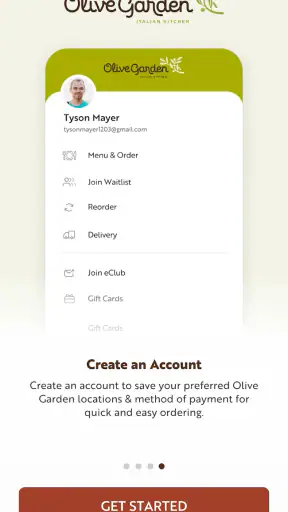
Gift cards are another example of a task that benefits from being kept separate from a meal order. I would use that part of the app when preparing for a birthday, holiday, or thank-you gesture, rather than trying to improvise at the restaurant. The workflow is useful because it turns a gift-card purchase into something I can handle while planning, but it does not make the app a complete personal finance or gift-management tool.
For group use, I recommend assigning one person to manage the app and keeping the rest of the discussion outside the checkout flow. Multiple people changing the plan at the same time is a common source of confusion in any restaurant-ordering experience. The app can support the decision, but it cannot decide whether your group wants to dine in, wait, or take food home.
Perceived speed matters most when I am hungry and trying to complete a simple task. I expect the location and ordering screens to feel direct, but I would not judge the whole app by a single quick launch. Restaurant tools depend on current location and order context, so a short pause while details load would not surprise me. What matters is whether the app recovers clearly when I change my mind or need to revisit the selected restaurant.
Reliability and recovery when plans change
I value recovery more than a flashy interface in an app like this. Restaurant plans change constantly: a group grows, a person decides to stay home, the preferred location is inconvenient, or the timing shifts from dine-in to ToGo. The app is most successful when it lets me return to the relevant task without making me reconstruct the entire plan from memory.
My advice is to review the selected location and the type of order before confirming anything. That small pause is particularly important when several Olive Garden restaurants are within driving distance. A location finder helps me find a restaurant, but I still need to make sure it is the one that fits my route and intended pickup plan.
The Wait List deserves similar care. I would not join it casually and then treat it as a reservation that can be ignored. If my travel time changes, I would check the app again and reassess the plan rather than assuming the original timing still works. This is a behavioral limitation rather than a flaw in the interface: digital convenience can make people forget that the restaurant’s real-world capacity is changing.
ToGo orders also benefit from a final review. I would verify the restaurant, pickup intention, and order details before submitting, especially when ordering for several people. The app can make the process faster than ordering in person, but speed is not useful if I rush through the wrong location or an outdated group decision.
In terms of stability, I see the long-running product and continued current version as reassuring signs, but I would still keep a fallback mindset. If the app does not behave as expected at a critical moment, the sensible alternative is to contact the restaurant or use another ordinary route rather than repeatedly tapping the same screen. The app should reduce effort, not become the only thing standing between me and dinner.
Device requirements and everyday practicality
The minimum operating-system requirement is iOS 11. That is not an especially demanding baseline for many modern phones, but it still matters if you are using an older device that has not been updated. Before relying on the app for a planned meal, I would install it ahead of time rather than waiting in the parking lot to discover that the phone cannot run the current version.
Because this is a restaurant utility, I do not expect it to be a major resource burden compared with games, video editors, or large entertainment apps. Its demanding moments are more likely to come from loading restaurant information and completing an order than from extended processing. I would still avoid opening it with a nearly full phone or an unstable connection when timing matters, since any service-dependent app can feel slow when the device or network is already struggling.
A useful device habit is to keep the phone charged before using the app for navigation-related planning or a group pickup. The app itself is not the only part of the experience: switching to maps, messaging family members, and checking the time can all happen during the same outing. The practical strain comes from the whole workflow, not simply from having a restaurant app installed.
I also prefer using the app while I have enough attention to read each step. It is not a tool I would recommend operating while driving or while rushing through a crowded entrance. Complete the planning before leaving, or let a passenger handle it. That approach makes the app feel calmer and reduces the risk of choosing the wrong location or order type.
For older phones that meet the operating-system requirement, the main question is not whether the app can be installed but whether the overall experience remains comfortable. A small display, limited storage, or an aging battery can make any ordering workflow less pleasant. In that situation, a browser or direct restaurant contact may be preferable if you only need a one-time action.
Who should use it and who should skip it
I would recommend Olive Garden Italian Kitchen to regular Olive Garden customers, families who often need to coordinate meals, and people who prefer arranging ToGo before arriving. It is also a sensible choice for anyone who buys Olive Garden gift cards and wants that task available alongside location and ordering tools.
The app is particularly useful for people who dislike making restaurant decisions at the last minute. A simple routine works well: identify the location, decide between the Wait List and ToGo, review the plan with the group, and then complete the relevant action. That sequence turns a vague dinner discussion into a manageable set of steps.
I would skip it if you rarely visit Olive Garden or if you mainly want to compare restaurants across different brands. Installing a single-chain app for one occasional meal may create more clutter than value. A map, browser, or multi-restaurant ordering service is usually better for discovering options, comparing cuisines, and checking several businesses at once.
I would also choose a broader alternative when delivery comparison is the main goal. This app makes sense for Olive Garden’s own restaurant-related tasks, while a general service is more suitable when I want to compare delivery availability, fees, or restaurants in the same area. The better option depends on whether brand-specific convenience or broad choice matters more.
My performance verdict after using it as a restaurant tool
Olive Garden Italian Kitchen succeeds because it keeps its attention on a small number of useful actions. I can find a restaurant, plan around the Wait List, arrange ToGo, and handle gift cards without treating the app like a general-purpose food platform. That focus makes it easy to recommend to the right person, even though it limits its usefulness for everyone else.
My performance verdict is that it feels practical rather than impressive. I would install it before a planned Olive Garden visit, especially when timing or group coordination matters. I would not depend on it as my only backup during a time-critical meal, and I would not use it instead of a broad restaurant search tool when I am still deciding where to eat.
The 3.5 average rating reflects the balanced conclusion I reach: the app offers real convenience, but the experience may not be equally smooth for every user or every situation. Its mature history, current version, free price, and large install base make it easy to try without much commitment, while the Everyone rating keeps it accessible for general household use.
In the end, I see it as a useful companion for a specific habit. If Olive Garden is already your destination, the app can make the visit easier to organize and can move some of the waiting and decision-making away from the restaurant entrance. If you want discovery, cross-brand comparison, or a universal food-ordering solution, I would keep using the usual broader alternatives instead. The best reason to install it is not curiosity; it is having a real Olive Garden task to complete.


